Dernière modification 11 avril 2020
Hl://Dig est un moteur de recherche performant pour votre site intranet, il peut mettre en index vos sites web internes mais aussi ceux se trouvant sur le net. Il marche sur plusieurs plate formes, dont évidemment Linux. C'est un fork de l'outil Ht://Dig qui n'est plus maintenu.
Dans la suite de ma page je présente un site intranet ayant pour adresse asterix.kervao.fr et tournant sous Apache. On va réaliser un moteur de recherche pour ce site à l'aide de Hl://Dig accessible à partir de ce même site. La configuration par défaut est très satisfaisante, vous pouvez néanmoins consulter la doc livrée avec le package qui détaille toutes les subtilités de la configuration.
tar xvfz hldig-1.0.2.tar.gz
Cela va créer un répertoire hldig-1.0.2/ dans lequel on tapera configure avec les options suivantes :
./configure --with-apache=chemin-apache --prefix=/chemin-d-install --with-cgi-bin-dir=chemin-cgi-apache --with-image-dir=répertoire-contenant-image --with-search-dir=répertoire-contenant-script-recherche
Voilà la commande que j'ai tapée chez moi après avoir créé préalablement le répertoire /usr/local/apache2/htdocs/htdig :
./configure --prefix=/usr/local/htdig --with-apache=/usr/local/apache2 --with-cgi-bin-dir=/usr/local/apache2/cgi-bin --with-image-dir=/usr/local/apache2/htdocs/hldig --with-search-dir=/usr/local/apache2/htdocs/hldig
Puis
make
Et enfin en tant que root
make install
On rajoutera la ligne
/usr/local/htdig/lib/hldig
dans le fichier /etc/ld.so.conf et on tapera ldconfig
Cela va mettre en place un fichier hlsearch
dans le répertoire cgi-bin d'apache et rajoutez un script
de recherche sous le répertoire htdocs/hldig d'apache dont
on verra l'utilité plus tard. Les binaires sont sous /usr/local/hldig/bin,
le fichier de conf sous /usr/local/hldig/conf et les bases de
données sous /usr/local/hldig/db.
# définition de l'emplacement où se trouveront les bases de données
sur le site intranet
# attention, elles peuvent être assez grosses, pour info pour mon site
intranet contenant mes pages
# www.funix.org les bases font un total de 12Mo !
database_dir:
/usr/local/hldig/var/hldig
# Définition de l'adresse à partir de laquelle htdig doit construire
ses bases de données
# mettez ici l'URL de votre intranet
# vous pouvez éventuellement mettre l'URL de n'importe quel site sur
internet
start_url:
http://asterix.kervao.fr/
# votre site peut contenir des liens vers des sites extérieurs, cette
variable permet de
# limiter la rechercher à des pages de votre domaine
limit_urls_to:)
${start_url}
# This attribute is used for compressing the database. The
default is to
# set it to the same as the limit_urls_to above, plus some common
endings.
#
# Keep in mind that this list should be short. If your
start_url is a very
# long list of URLs, it may be wise to replace it with something like
# http://www. or comment this out and use the compiled-in default.
#
common_url_parts: ${limit_urls_to} .html .htm .shtml
# Définition des pages à ne pas indexer, ce sont donc celles qui sont
dans
# http://www.funix.kervao.fr/cgi-bin par exemple ici
exclude_urls:%)
/cgi-bin/ .cgi
# fichiers qui seront ignorés pendant l'indexation
bad_extensions: .wav
.gz .z .sit .au .zip .tar .hqx .exe .com .gif \
.jpg
.jpeg .aiff .class .map .ram .tgz .bin .rpm .mpg .mov .avi
# adresse email de l'administrateur
maintainer:
olivier@kervao.fr
# Par défaut un extrait de chaque page est archivé dans la base, vous
pouvez limiter
# évidemment cette taille
max_head_length: 10000
# si vous récupérez des pages sur internet (indexation de sites sur
internet) vous pouvez aussi
# limiter la taille des pages à récupérer
max_doc_size:%) 200000
#
# Most people expect some sort of excerpt in results. By default, if
the
# search words aren't found in context in the stored excerpt, htsearch
shows
# the text defined in the no_excerpt_text attribute:
# (None of the search words were found in the top of this document.)
# This attribute instead will show the top of the excerpt.
#
no_excerpt_show_top: true
#
# Depending on your needs, you might want to enable some of the fuzzy
search
# algorithms. There are several to choose from and you can use
them in any
# combination you feel comfortable with. Each algorithm will get
a weight
# assigned to it so that in combinations of algorithms, certain
algorithms get
# preference over others. Note that the weights only affect the
ranking of
# the results, not the actual searching.
# The available algorithms are:
# exact
# endings
# metaphone
# prefix
# soundex
# synonyms
# By default only the "exact" algorithm is used with weight 1.
# Note that if you are going to use the endings, metaphone, soundex,
# or synonyms algorithms, you will need to run htfuzzy to generate
# the databases they use.
#
search_algorithm: exact:1
synonyms:0.5 endings:0.1
#
# The following are the templates used in the builtin search results
# The default is to use compiled versions of these files, which
produces
# slightly faster results. However, uncommenting these lines makes it
# very easy to change the format of search results.
# See <http://www.htdig.org/hts_templates.html for more details.
#
# template_map: Long long ${common_dir}/long.html \
#
Short
short ${common_dir}/short.html
# template_name: long
# end:
On va maintenant explorer le site web et récupérer les pages en tapant
/usr/local/hldig/bin/hldig -ivs
Si vous avez un mot de passe pour accéder à la page, il faudra taper
/usr/local/hldig/bin/hldig -ivs -u user:password
Ne vous inquiétez pas si votre site est écrit en PHP, ça marche aussi
très bien.
L'option -i permet d'effacer les recherches précédentes et de
repartir de zéro, l'option -v est l'option "verbeuse". Cela donne
quelque chose comme cela
hldig Start Time: sam. avril 11 12:02:35 2020
New server: asterix.kervao.fr,
0:2:0:http://asterix.kervao.fr/: -++++++****+++---------------- size =
13682
1:3:1:http://asterix.kervao.fr/images/favicon.png: not Parsable
2:11:1:http://asterix.kervao.fr/carte.htm:
*++++++++++++++++++++++++++++++++++++++++++++++++++*++++++++++*++++++++++++++*++++++++++++++++*++*+++++++++++++++++++++++++++++++++++++++++++++++++++++++++*+++++++++++**-*-
size = 25419
3:10:1:http://asterix.kervao.fr/banniere.htm: * size = 1098
4:4:1:http://asterix.kervao.fr/index.php: -************----------------
size = 13683
5:6:1:http://asterix.kervao.fr/fr/unix/index.php:
-****+**+***+**+***+*****+**+***+**+**+*****+*****+*-*-- size = 10732
6:7:1:http://asterix.kervao.fr/fr/hpux/index.php: -***+++++++++++More
than one <title> tag in document! (possible search engine
spamming)
*+- size = 5030
7:5:1:http://asterix.kervao.fr/fr/linux/index.php:
-****+++++++++++++++++++++++++++++*+*+++*++++++++++++++++++++++++++++++++++++++++++++++++++More
than one <title> tag in document! (possible search engine
spamming)
-*-*****************--******+*********+*+***********************- size =
29118
8:8:1:http://asterix.kervao.fr/fr/linuxdoc/download.htm:
-+**+-------+++++-++++++++++++++-+---++------- size = 21862
9:9:1:http://asterix.kervao.fr/historique.htm: -------+-*-*-*+*****-*
size = 200000
10:305:2:http://asterix.kervao.fr/fr/linuxdoc/video/tutorial-kino.pdf:
not found
11:307:2:http://asterix.kervao.fr/fr/linux/main.htm:
-*-*****************--****************************************** size =
17543
12:306:2:http://asterix.kervao.fr/linuxdoc/download.htm: not found
13:304:2:http://asterix.kervao.fr/fr/linuxdoc/video/pvr.pdf: not
found
14:303:2:http://asterix.kervao.fr/fr/linuxdoc/masquerade/masquerade.pdf:
not found
15:302:2:http://asterix.kervao.fr/fr/linuxdoc/video/mao-utilisation.pdf:
not found
16:301:2:http://asterix.kervao.fr/fr/linuxdoc/video/mao.pdf: not
found
17:300:2:http://asterix.kervao.fr/fr/linuxdoc/video/tutorial-kdenlive.pdf:
not found
18:299:2:http://asterix.kervao.fr/fr/linuxdoc/video/tutorial-kdenlive18.pdf:
not found
19:298:2:http://asterix.kervao.fr/fr/linuxdoc/video/webcam.pdf:
not found
20:297:2:http://asterix.kervao.fr/fr/linuxdoc/video/dvdauthoring.pdf:
not found
21:296:2:http://asterix.kervao.fr/fr/linuxdoc/video/tutorial-openshot.pdf:
not found
22:295:2:http://asterix.kervao.fr/fr/linuxdoc/video/tutorial-lives.pdf:
not found
23:294:2:http://asterix.kervao.fr/fr/linuxdoc/video/tutorial-cinelerra.pdf:
not found
24:293:2:http://asterix.kervao.fr/fr/linuxdoc/ldap/ldap.pdf: not
found
25:292:2:http://asterix.kervao.fr/fr/linuxdoc/securite/gnupg.pdf:
not found
26:291:2:http://asterix.kervao.fr/fr/linuxdoc/securite/securite.pdf:
not found
27:290:2:http://asterix.kervao.fr/fr/linuxdoc/proxy/proxy.pdf: not
found
28:289:2:http://asterix.kervao.fr/fr/linuxdoc/video/video-sous-linux.pdf:
not found
29:288:2:http://asterix.kervao.fr/fr/linuxdoc/securite/openssh.pdf:
not found
30:287:2:http://asterix.kervao.fr/fr/linuxdoc/apache/apache-unix.pdf:
not found
31:286:2:http://asterix.kervao.fr/fr/linuxdoc/nis/nis.pdf: not
found
32:285:2:http://asterix.kervao.fr/fr/linuxdoc/sendmail/sendmail.pdf:
not found
33:284:2:http://asterix.kervao.fr/fr/linuxdoc/mountage/mountage.pdf:
not found
34:283:2:http://asterix.kervao.fr/fr/hpux/main-hpux.php?ref=main&page=menu:
not found
35:282:2:http://asterix.kervao.fr/fr/reseau/main-reseau.php?ref=main&page=menu:
** size = 1548
36:280:2:http://asterix.kervao.fr/fr/linux/index.php?ref=php:
-*******************************************************************************************More
than one <title> tag in document! (possible search engine
spamming)
-*-*****************--*****************************************- size =
29118
37:279:2:http://asterix.kervao.fr/fr/linux/index.php?ref=logapache.htm:
-*******************************************************************************************More
than one <title> tag in document! (possible search engine
spamming)
-*-*****************--*****************************************- size =
29118
38:278:2:http://asterix.kervao.fr/fr/linux/index.php?ref=pda:
-******************************************************************************************More
than one <title> tag in document! (possible search engine
spamming)
------- size = 42446
39:277:2:http://asterix.kervao.fr/fr/linux/index.php?ref=setiathome:
-******************************************************************************************More
than one <title> tag in document! (possible search engine
spamming)
--- size = 29961
(...)
HTTP statistics
===============
Persistent connections : Yes
HEAD call before GET : Yes
Connections opened : 10
Connections closed : 9
Changes of server
: 0
HTTP
Requests
: 722
HTTP KBytes requested : 4948.29
HTTP Average request time : 0.0138504 secs
HTTP Average speed :
494.829 KBytes/secs
hldig End Time: Sat Apr 11 12:02:59 2020
On crée à présent l'index en tapant :
/usr/local/hldig/bin/hlmerge -v
Suivant la taille du site, la commande peut être plus ou moins longue. Dans le fichier de configuration d'Apache, j'ai rajouté la ligne suivante
Alias /www "/usr/local/apache2/htdocs/hldig"
Pour que les images s'affichent correctement. Maintenant il faut créer un script lancé régulièrement par cron qui met à jour régulièrement la base de donnée et l'index.
#!/bin/bash
/usr/local/hldig/bin/hldig
/usr/local/hldig/bin/hlmerge
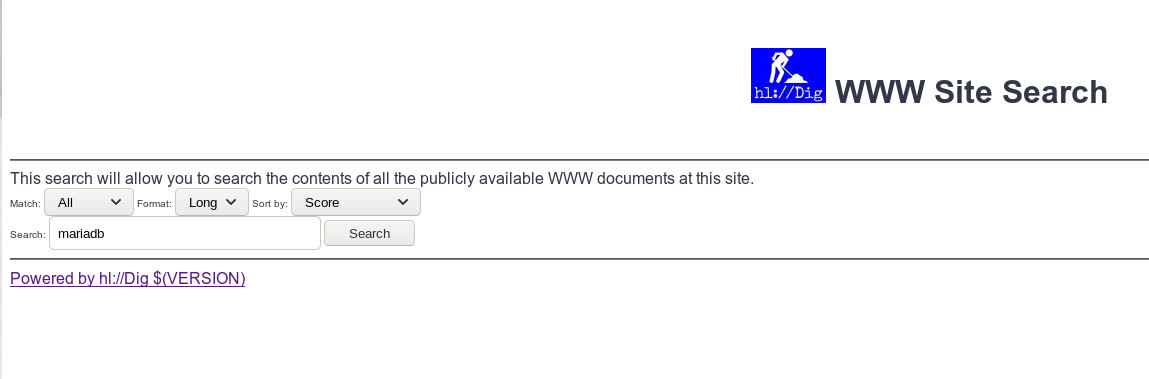
URL: http://asterix.kervao.fr/hldig/search.html
Voilà le résultat de la recherche
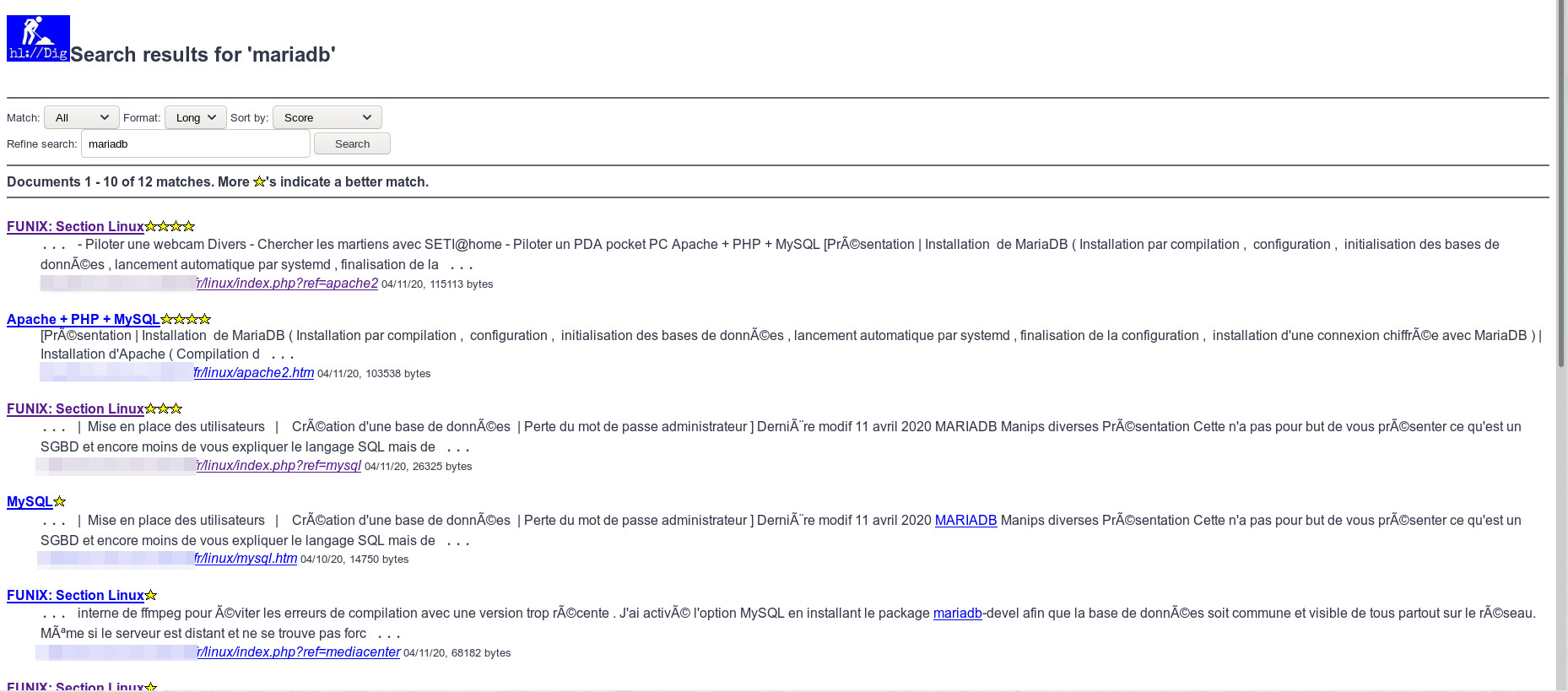
Les pages sont classées suivant qu'elles collent plus ou moins avec la
recherche, mais vous pouvez éventuellement modifier le type de tri (Sort
by). Pour info on utilise un modèle de présentation des résultats se
trouvant sous /usr/local/hldig/share/templates.
| [Retour page d'accueil FUNIX] | [Retour haut de la page] |